# My Favorite Smart Home Automations
 As I wrote in [my Home Automation Story post](/technical/my-story),
I use Home Assistant to automate my Smart Home.
I've done the usual things like installing smart light switches and outlets and
have certain lights come on and go off at set times. The easy stuff.
But I have a few automations that I'm really happy with and proud of.
Better still, it has a high AF (Approval Factor) from my wife.
---
# Shower Humidity
Many times when taking a shower, the hot water causes the humidity in the
bathroom to rise. This can, of course, fog up the mirror and make the room
stuffy. One easy fix is to turn on the fan before taking a shower. But if the
humidity is still high when I'm done in the bathroom, I will sometimes leave
the fan on and go about my day. However, wouldn't it be nice if the fan would
turn on AND off automatically?
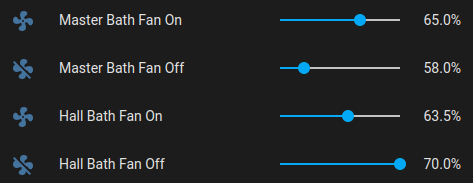
Now, when the humidity in the bathroom goes above a certain level, the fan
turns on automatically. Then, once the humidity goes back down, the fan
turns off.
As I wrote in [my Home Automation Story post](/technical/my-story),
I use Home Assistant to automate my Smart Home.
I've done the usual things like installing smart light switches and outlets and
have certain lights come on and go off at set times. The easy stuff.
But I have a few automations that I'm really happy with and proud of.
Better still, it has a high AF (Approval Factor) from my wife.
---
# Shower Humidity
Many times when taking a shower, the hot water causes the humidity in the
bathroom to rise. This can, of course, fog up the mirror and make the room
stuffy. One easy fix is to turn on the fan before taking a shower. But if the
humidity is still high when I'm done in the bathroom, I will sometimes leave
the fan on and go about my day. However, wouldn't it be nice if the fan would
turn on AND off automatically?
Now, when the humidity in the bathroom goes above a certain level, the fan
turns on automatically. Then, once the humidity goes back down, the fan
turns off.
 ## Hardware:
* Aqara Zigbee Temperature and Humidity Sensor (WSDCGQ11LM) in one bathroom
* Sonoff Zigbee Mini Indoor Temperature and Humidity Sensor (SNZB-02) in another
## Automations:
* Hall Bath Humidity - Fan On: Turns the fan on when the humidity goes above
the chosen level
* Hall Bath Humidity - Fan Off: Turns the fan off when the humidity goes below
the chosen level
* Master Bath Humidity - Fan On: Turns the fan on when the humidity goes above
the chosen level
* Master Bath Humidity - Fan Off: Turns the fan off when the humidity goes below
the chosen level
---
# Washer/Dryer Notifications
How many times have you left wet clothes in the washer. Or you've forgotten
about the clothes in the dryer only to have to "toss them" so they're less
wrinkly?
Using two different devices, I measure the amount of power the washer and
dryer are using. After they've been running, when the washer or dryer go
below the amount of energy used when in use, we get notifications on our phones
and Google Home tells us that the washer or dryer is done.
## Hardware:
* TOPGREENER Smart Wi-Fi Outlet with USB (TGWF215U2AM): Since our washer uses
standard 120 volts, this outlet works. It provides energy usage reporting for
the smart outlet (the top outlet is always on and does not report usage -- we
do not use that outlet for anything). This outlet also includes two USB plugs,
one of which is used to power the devices for the dryer.
* Wemos D1 Mini: small ESP8266 computer running
[Tasmota](https://github.com/arendst/Tasmota) to read the dryer's
energy usage and send it to MQTT where Home Assistant can access it.
* [Split Core Current Transformer](https://amzn.to/2XDcnoX) to read
the current being generated by the dryer that the D1 Mini can read.
* A small plastic box to contain the D1 Mini that is attached to the dryer with
double-sided tape.
* A USB cable to power the D1 Mini, which is plugged into the washer's outlet.
## Directions
* I followed DigiBlur's excellent
[post](https://digiblur.com/2019/04/18/diy-smart-laundry-electric-dryer-voice-notifications)
and [video](https://youtu.be/1tqJkw5f0iA) about setting this up.
## Home Assistant Helpers
* A "Washer Is Running" Toggle
* A "Dryer Is Running" Toggle
## Automations
* Washer Started - When the "Outlet ENERGY Power" used by the washer goes above
2 for more than 5 minutes, the "Washer Is Running" toggle is turned on. This
indicates that the washer is actually running.
* Washer Stopped - When the "Outlet ENERGY Power" used by the washer goes below
3 for more than 3 minutes AND the "Washer Is Running" toggle is on, the
"Washer Is Running" toggle is turned off and we get the announcements that
the washer is done.
* Dryer Started - When the "ANALOG CTEnergy Power" used by the dryer's CT Clamp
goes above 750 for more than 2 minutes, the "Dryer Is Running" toggle is
turned on. This indicates that the dryer is actually running.
* Washer Stopped - When the "ANALOG CTEnergy Power" used by the dryer's CT Calmp
goes below 500 for more than 1 minute AND the "Dryer Is Running" toggle is on,
the "Dryer Is Running" toggle is turned off and we get the announcements that
the dryer is done.
## Comments
I had to play with the energy and CTEnergy values were. For some cycles of the
washer, it goes below 3 for a minute or two. So the "3 minutes" threshold is
to prevent false notifications during those cycles.
---
# Gate and Shed Notifications
We have a fenced in back yard. Each side of the house has a gate. Occasionally
a meter reader will come to take a reading from our gas meter in the back and
will not properly shut the gate. Then our dog gets out because we didn't know
that the meter reader was here at all nor that they didn't properly close the
gate.
I installed door contact sensors on each gate.
Additionally, we have a shed that is attached to, but outside of our house.
Weirdly, the electrical panel is in this shed. So we have to go OUTSIDE to
deal with any circuit breaker problems. Because of this, we want to know if
the shed is ever opened. Inside the shed, I have a smart light that we used
to have to turn on with our phones or tell Google to do it.
I used door contact sensors to notify us when the shed is opened AND to
automtically turn on the Shed light when the doors are opened (and off when
they are closed).
## Hardware
* 3 THIRDREALITY Zigbee Contact Sensors (3RDS17BZ)
* Airand Utility LED Shop Light Fixture 2FT 4FT with Plug
* AICLIV SOP03US 3 Port Wi-Fi Outdoor Strip running Tasmota
## Automations
* When either gate contact sensor is open, we get a notification on our phones
and Google announces that the particular gate has been opened. We get
similar notifications when the gate is closed.
* The shed contact sensor works the same way, but it ALSO turns the light on
when the shed door is opened and turns the light off when the shed door is
closed.
## Summary
This gives us piece of mind when the gates have been inadvertantly left open or
knowing that we will get notified if someone tries to open our shed.
## Hardware:
* Aqara Zigbee Temperature and Humidity Sensor (WSDCGQ11LM) in one bathroom
* Sonoff Zigbee Mini Indoor Temperature and Humidity Sensor (SNZB-02) in another
## Automations:
* Hall Bath Humidity - Fan On: Turns the fan on when the humidity goes above
the chosen level
* Hall Bath Humidity - Fan Off: Turns the fan off when the humidity goes below
the chosen level
* Master Bath Humidity - Fan On: Turns the fan on when the humidity goes above
the chosen level
* Master Bath Humidity - Fan Off: Turns the fan off when the humidity goes below
the chosen level
---
# Washer/Dryer Notifications
How many times have you left wet clothes in the washer. Or you've forgotten
about the clothes in the dryer only to have to "toss them" so they're less
wrinkly?
Using two different devices, I measure the amount of power the washer and
dryer are using. After they've been running, when the washer or dryer go
below the amount of energy used when in use, we get notifications on our phones
and Google Home tells us that the washer or dryer is done.
## Hardware:
* TOPGREENER Smart Wi-Fi Outlet with USB (TGWF215U2AM): Since our washer uses
standard 120 volts, this outlet works. It provides energy usage reporting for
the smart outlet (the top outlet is always on and does not report usage -- we
do not use that outlet for anything). This outlet also includes two USB plugs,
one of which is used to power the devices for the dryer.
* Wemos D1 Mini: small ESP8266 computer running
[Tasmota](https://github.com/arendst/Tasmota) to read the dryer's
energy usage and send it to MQTT where Home Assistant can access it.
* [Split Core Current Transformer](https://amzn.to/2XDcnoX) to read
the current being generated by the dryer that the D1 Mini can read.
* A small plastic box to contain the D1 Mini that is attached to the dryer with
double-sided tape.
* A USB cable to power the D1 Mini, which is plugged into the washer's outlet.
## Directions
* I followed DigiBlur's excellent
[post](https://digiblur.com/2019/04/18/diy-smart-laundry-electric-dryer-voice-notifications)
and [video](https://youtu.be/1tqJkw5f0iA) about setting this up.
## Home Assistant Helpers
* A "Washer Is Running" Toggle
* A "Dryer Is Running" Toggle
## Automations
* Washer Started - When the "Outlet ENERGY Power" used by the washer goes above
2 for more than 5 minutes, the "Washer Is Running" toggle is turned on. This
indicates that the washer is actually running.
* Washer Stopped - When the "Outlet ENERGY Power" used by the washer goes below
3 for more than 3 minutes AND the "Washer Is Running" toggle is on, the
"Washer Is Running" toggle is turned off and we get the announcements that
the washer is done.
* Dryer Started - When the "ANALOG CTEnergy Power" used by the dryer's CT Clamp
goes above 750 for more than 2 minutes, the "Dryer Is Running" toggle is
turned on. This indicates that the dryer is actually running.
* Washer Stopped - When the "ANALOG CTEnergy Power" used by the dryer's CT Calmp
goes below 500 for more than 1 minute AND the "Dryer Is Running" toggle is on,
the "Dryer Is Running" toggle is turned off and we get the announcements that
the dryer is done.
## Comments
I had to play with the energy and CTEnergy values were. For some cycles of the
washer, it goes below 3 for a minute or two. So the "3 minutes" threshold is
to prevent false notifications during those cycles.
---
# Gate and Shed Notifications
We have a fenced in back yard. Each side of the house has a gate. Occasionally
a meter reader will come to take a reading from our gas meter in the back and
will not properly shut the gate. Then our dog gets out because we didn't know
that the meter reader was here at all nor that they didn't properly close the
gate.
I installed door contact sensors on each gate.
Additionally, we have a shed that is attached to, but outside of our house.
Weirdly, the electrical panel is in this shed. So we have to go OUTSIDE to
deal with any circuit breaker problems. Because of this, we want to know if
the shed is ever opened. Inside the shed, I have a smart light that we used
to have to turn on with our phones or tell Google to do it.
I used door contact sensors to notify us when the shed is opened AND to
automtically turn on the Shed light when the doors are opened (and off when
they are closed).
## Hardware
* 3 THIRDREALITY Zigbee Contact Sensors (3RDS17BZ)
* Airand Utility LED Shop Light Fixture 2FT 4FT with Plug
* AICLIV SOP03US 3 Port Wi-Fi Outdoor Strip running Tasmota
## Automations
* When either gate contact sensor is open, we get a notification on our phones
and Google announces that the particular gate has been opened. We get
similar notifications when the gate is closed.
* The shed contact sensor works the same way, but it ALSO turns the light on
when the shed door is opened and turns the light off when the shed door is
closed.
## Summary
This gives us piece of mind when the gates have been inadvertantly left open or
knowing that we will get notified if someone tries to open our shed.