
Tricks

Using Yad for ssh-askpass

OpenSSH

ssh-askpass is an X11 application for passing a user’s SSH Key passphrase to ssh-add ssh-add(1). But it only works with X11. And I’m on Wayland now.

Solution

Yad. Yad is Yet Another Dialog ala Zenity or Dialog. It allows for taking in input and passing it to something else in a similar way to the way ssh-askpass worked with X11.

A screenshot

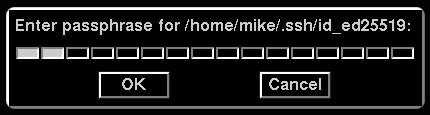
This is how my yad-askpass window looks:
Applying style to ssh-askpass

OpenSSH

ssh-askpass(1) is a graphical program that prompts the user for their SSH Key passphrase and passes it to the ssh-add(1) command.

Out of the box, ssh-askpass is pretty ugly, but I’ve managed to make it look dark, modern, and good.

A screenshot

This is how my ssh-askpass window looks:

ssh-askpass

The code

SshAskpass*Dialog.font:       -adobe-helvetica-bold-r-normal-*-*-120-*-*-*-*-iso8859-1
SshAskpass*Dialog.label:      Please enter your authentication passphrase:
SshAskpass*Dialog.title:
SshAskpass*background:        #000000
SshAskpass*foreground:        #cccccc
SshAskpass.Button*background: #000000
SshAskpass.Button*foreground: #cccccc

The above code goes in your ${HOME}/.Xresources file.