Linux

Centralized Bookmarks with Linkding

Linkding

As I mentioned in my Qutebrowser article, my browser doesn’t have the ability to share bookmarks with my other browsers. I run Chrome on my phone and Chrome on my Chromebook. And I have a second Linux laptop that also runs Qutebrowser.

I needed a solution to share bookmarks between them. And I settled on Linkding.

My Search

I looked through Reddit r/selfhost and scoured the web looking at different self-hosted bookmark services I could run at home.


Qutebrowser

Qutebrowser

These days, it’s more important than ever to find a good web browser: one that’s easy to use, has the functionality you want, and, most importantly, is reasonably secure. It’s also a good idea to consider the privacy features the browser has too.

Too many of the popular browsers have privacy issues (Chrome sharing info with Google, Edge sharing info with Microsoft, Brave sharing info with…).

Applying style to ssh-askpass

OpenSSH

ssh-askpass(1) is a graphical program that prompts the user for their SSH Key passphrase and passes it to the ssh-add(1) command.

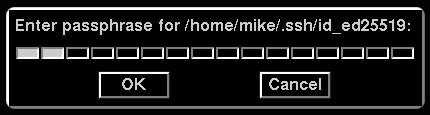
Out of the box, ssh-askpass is pretty ugly, but I’ve managed to make it look dark, modern, and good.

A screenshot

This is how my ssh-askpass window looks:

ssh-askpass

The code

SshAskpass*Dialog.font:       -adobe-helvetica-bold-r-normal-*-*-120-*-*-*-*-iso8859-1
SshAskpass*Dialog.label:      Please enter your authentication passphrase:
SshAskpass*Dialog.title:
SshAskpass*background:        #000000
SshAskpass*foreground:        #cccccc
SshAskpass.Button*background: #000000
SshAskpass.Button*foreground: #cccccc

The above code goes in your ${HOME}/.Xresources file.